Give your courier customers one link to quote, book, pay and manage deliveries.
A courier booking portal should do more than collect a form. Speedy Courier Software gives each courier company a unique booking URL that supports public card bookings and registered customer account access from the same page.
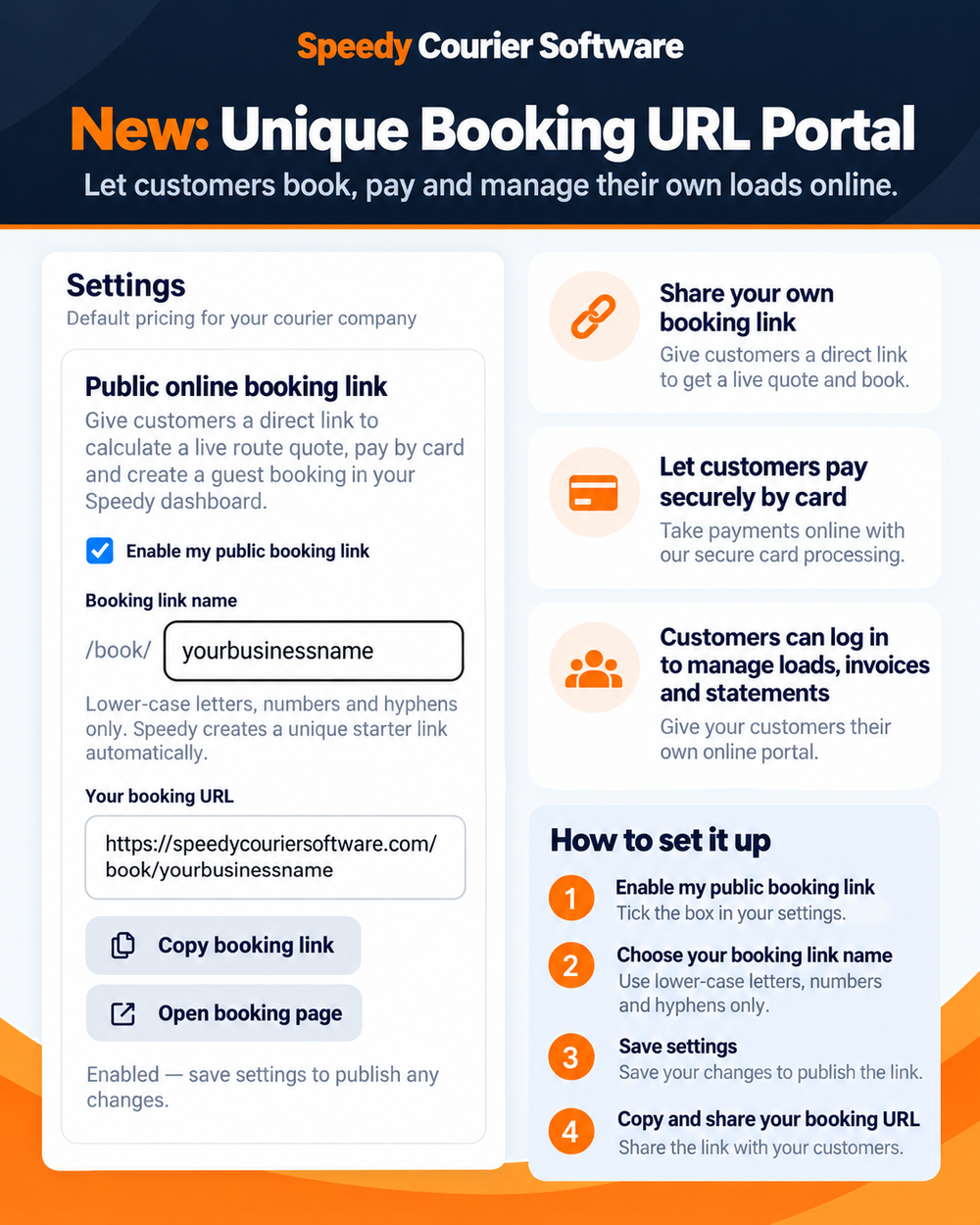
What is a courier booking portal?
A courier booking portal is an online customer-facing page connected directly to the courier's operating system. Instead of emailing collection details or calling the office for every update, customers can enter job information themselves and the booking flows into the courier dashboard.
For a small courier company, the useful part is not simply having another web form. The booking page needs to use the same tariffs, customer records, job workflow, tracking and billing data as the office team.
One URL for new customers and account customers
Speedy gives each courier operator its own shareable URL. A new or occasional customer can use the page without an account to request a live route quote and pay by card. A registered trade customer can use the same page to log in and access their account relationship.
Enter collection and delivery details → receive a live quote → pay securely by card → booking appears in the courier dashboard → paid invoice is generated.
Log in → use agreed customer-specific or default rates → place account bookings → view active and completed jobs → access PODs, invoices and statements.
Why unique online booking links matter for independent couriers
- Less re-keying: booking details enter the operating system directly instead of being copied from messages or emails.
- 24/7 enquiry capture: customers can price and place suitable work even when the office is busy.
- Faster payment: guest bookings can be paid before the job is accepted into the workflow.
- Customer self-service: account customers can find job and billing information without calling the courier office.
- Consistent pricing: quotes use the courier company's live tariff, while registered customers can retain negotiated rates.
Customer portal features connected to the job
The registered-customer experience is connected to the same job record used by the office and driver. Customers can see their active and completed work, delivery status and proof of delivery, plus invoices and statements generated from the operational data.
The booking page also carries the courier company's own contact details so customers have a direct telephone and email route when they need support.
How to set up your Speedy booking URL
Existing Speedy customers can enable the public booking link from Settings, choose the booking link name, save the settings and copy the resulting URL. Our step-by-step guide covers the full process, including guest bookings and inviting registered account customers.
Read the booking URL setup guide →
Courier management software with online booking built in
Speedy connects customer booking, dispatch, drivers, tracking, POD, invoicing and account self-service in one system. Plans start from £30/month, with the first month free.
Start your free trial →